


 Send Inquiry
Kali Audio Lp 8 Active Near-Field Studio Monitor
MOQ : 1 Pair
Kali Audio Lp 8 Active Near-Field Studio Monitor Specification
- HDMI
- No
- Aux Option
- NO
- Remote Controlled
- NO
- Channels
- Bi-Amped (2-Way)
- Auto Memory
- No
- FM Turner
- NO
- Product Type
- Kali Audio Lp 8 Active Near-Field Studio Monitor
- Material
- MDF Cabinet
- Input Power
- 100-240V AC, 50/60 Hz
- Frequency Range (Hz)
- 45 - 21000 Hertz (HZ)
- Sound Level
- 85 dB SPL @ 1m
- Earphone/Headphones Plugin
- No
- Include Display
- No
- Game Function
- No
- Dimension (L*W*H)
- 10 x 16.5 x 11.3 Inch (in)
- Weight (kg)
- 9.0 Kilograms (kg)
- Color
- Black
- Warranty
- 1 Year
- Mounting Options
- Free standing or isolation pads (not included)
- Enclosure Type
- Front-firing bass reflex (ported)
- Maximum Continuous SPL
- 104 dB SPL
- Crossover Frequency
- 1.8 kHz
- Placement
- Near-field
- Input Types
- XLR (Balanced), TRS (Balanced), RCA (Unbalanced)
- Speaker Configuration
- 8-inch LF Driver + 1-inch HF Soft Dome
- Power Consumption
- Max 100 W
- Amplifier Power
- 80W (LF 60W + HF 20W), Class D
- Input Impedance
- XLR/TRS 10k, RCA 10k
Kali Audio Lp 8 Active Near-Field Studio Monitor Trade Information
- Minimum Order Quantity
- 1 Pair
- Supply Ability
- 10 Pairs Per Week
- Delivery Time
- 7 Days
Kali Audio Lp 8 Active Near-Field Studio Monitor About
The black Lone Pine Series LP-8 8" Studio Monitor from Kali Audio is designed for you to hear every detail thats happening in your mix during recording, broadcast, and mixing applications. It features an accurate frequency response, a 3D-imaging Waveguide with nothing boosted or suppressed to cover flaws or try to sound more pleasing.
Built with a low-noise port tube, this speaker delivers clean, punchy bass. The dual-layer, large-diameter voice coil keeps the sound clear and free of distortion. Other features include: boundary EQ dip switch tuning to tailor common placement positions in a space, balanced XLR, TRS, and unbalanced RCA inputs, and HF and LF input trim controls.
Additionally, the Lone Pine Series LP-8 8" Active Studio Monitors allow you to mix with more confidence, and you can be assured that your mix will translate as best as possible to whatever systems your audience is using.
Powerful & Precise Audio Performance
Designed for unbiased studio monitoring, the Kali Audio LP-8 features a robust Class D amplifier (60W LF + 20W HF) driving an 8-inch woofer and 1-inch soft dome tweeter. This configuration delivers transparent, accurate sound across a wide 45 Hz 21 kHz frequency range, supporting critical listening and detailed mix decisions.
Flexible Connectivity & Placement
Equipped with balanced XLR and TRS inputs along with unbalanced RCA, the LP-8 integrates seamlessly into diverse studio setups. Front-firing bass reflex ports and free-standing mounting allow flexible placement, ensuring optimal low-end response even in compact or untreated spaces.
Durable, User-Friendly Design
Composed of a sturdy MDF cabinet and weighing 9 kg, the LP-8 is built for durability while maintaining portability. Its simple, user-focused layout, universal power supply (100-240V), and passive cooling make it easy to install and use in any studio environment.
FAQs of Kali Audio Lp 8 Active Near-Field Studio Monitor:
Q: How do I connect the Kali Audio LP-8 monitor to my audio interface or mixer?
A: You can connect the LP-8 studio monitor using the balanced XLR or TRS inputs for professional-grade signal transmission or the unbalanced RCA input for consumer equipment. Simply match the appropriate cable from your audio interface or mixer to the corresponding input on the LP-8.Q: What is the recommended placement for the LP-8 monitors?
A: The LP-8 is designed as a near-field monitor, best placed at ear level, angled towards your typical listening position. It can be free-standing or placed on isolation pads (not included) for more accurate sound and reduced surface resonance.Q: When should I use the different input options (XLR, TRS, RCA)?
A: Use balanced XLR or TRS inputs when connecting to professional studio equipment to reduce noise and interference. RCA, which is unbalanced, is best for consumer audio devices such as media players when balanced connections are unavailable.Q: Where is the LP-8 best suited for use?
A: The LP-8 is ideal for home studios, professional audio workspaces, and project studios where accurate near-field monitoring is essential. Its front-firing port allows flexible placement even near walls without compromising bass response.Q: What is the process for setting up the LP-8 monitor?
A: Begin by placing the monitors at ear height, then connect your audio source using XLR, TRS, or RCA cables. Adjust input gain as needed, and ensure power is supplied via the included AC input (100-240V, 50/60Hz). Fine-tune positioning for optimal stereo imaging and clarity.Q: How does the LP-8 benefit my mixing and production workflow?
A: With its wide, accurate frequency response and high output (maximum SPL 104 dB), the LP-8 reveals sonic details and translation issues in your mixes. This enables better mix decisions and ensures your projects sound great across different playback systems.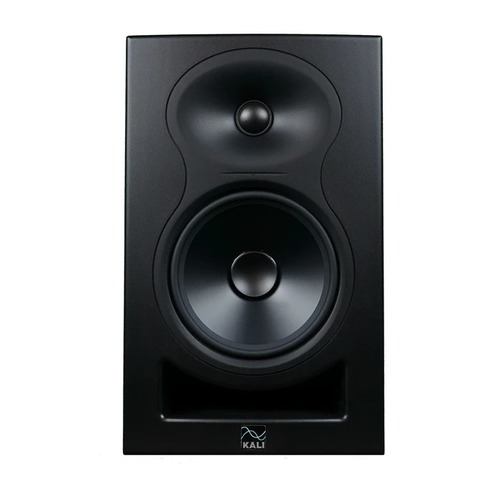
Tell us about your requirement

Price:
Quantity
Select Unit
- 50
- 100
- 200
- 250
- 500
- 1000+
Additional detail
Mobile number
Email

More Products in Studio Equipment Category
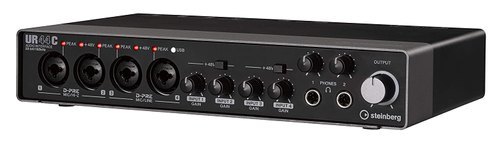
Steinberg Soundcard - UR44C
Price 25000 INR / Piece
Minimum Order Quantity : 1 Piece
Color : Black / Silver (as displayed in image)
Weight (kg) : 1.5 Kilograms (kg)
Remote Controlled : NO
USB Port : 1
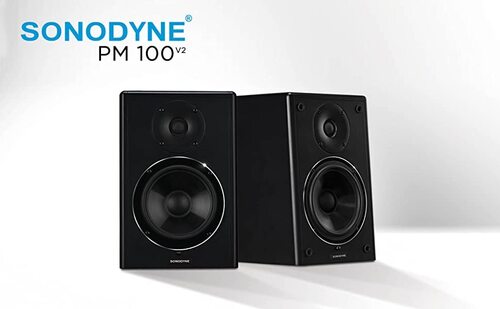
Sonodyne PM 100 V2 Production Monitor
Price 40000 INR / Pair
Minimum Order Quantity : 1 Pair
Color : Black
Weight (kg) : 10 Kilograms (kg)
Remote Controlled : NO
USB Port : NO
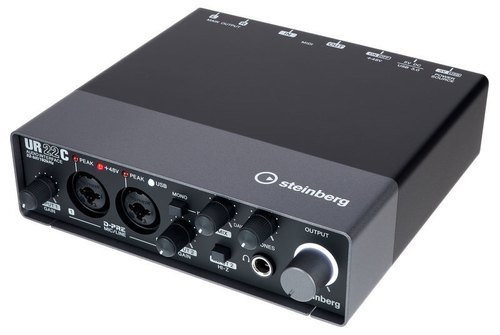
UR22C Steinberg Soundcard
Price 14000 INR / Piece
Minimum Order Quantity : 1 Piece
Color : Black/Grey
Weight (kg) : 1.0 Kilograms (kg)
Remote Controlled : NO
USB Port : Other, USB 3.0/USB TypeC
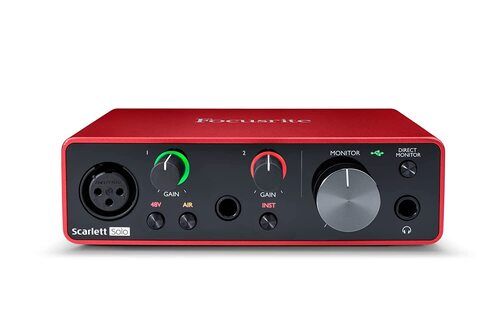
Focusrite Scarlett Solo 3rd Gen
Price 11000 INR / Piece
Minimum Order Quantity : 1 Piece
Color : Red & Black
Weight (kg) : 500 Gram (g)
Remote Controlled : NO
USB Port : Other, 1 x USB TypeC


- B No. 67, Ganesh Chandra Avenue -Ground Floor, Near Hind Cinema,Kolkata - 700013, West Bengal, India
- Phone : 08071931135


- Mr Ashwin Jaiswal (Proprietor)
- Mobile : 08071931135
-
 Send Inquiry
 Send Inquiry
TECHNO VIBEZ
All Rights Reserved.(Terms of Use)
Developed and Managed by Infocom Network Private Limited.
Developed and Managed by Infocom Network Private Limited.

