


 Send Inquiry
Novation Launchpad Mini MK3
Price 10000 INR/ Piece
MOQ : 1 Piece
Novation Launchpad Mini MK3 Specification
- Aux Option
- NO
- HDMI
- No
- FM Turner
- NO
- Remote Controlled
- NO
- Auto Memory
- No
- USB Port
- Yes (USB Type-B)
- Bluetooth
- NO
- Product Type
- MIDI Controller
- Material
- Plastic
- Input Power
- USB Bus Powered
- Earphone/Headphones Plugin
- No
- Include Display
- No
- Game Function
- No
- Dimension (L*W*H)
- 18.0 x 18.0 x 1.5 Centimeter (cm)
- Weight (kg)
- 0.38 Kilograms (kg)
- Color
- Black
- Included Accessories
- USB cable, Quick Start Guide
- Direct Integration
- Designed for Ableton Live
- Power Requirements
- USB bus powered (No external power supply needed)
- Supported Operating Systems
- Windows, macOS
- Hotkeys
- Customizable
- Launchpad Modes
- Drum, Session, Note
- Dimensions (inches)
- 7.1 x 7.1 x 0.6
- Connectivity
- USB (Plug-and-Play)
- LED Feedback
- Multicolor RGB
- Software Compatibility
- Ableton Live Lite Included; Compatible with most DAWs
- Control Type
- Velocity/Pressure-Sensitive Pads
- Pads
- 64 RGB Backlit Pads
Novation Launchpad Mini MK3 About
The Novation Launchpad Mini MK3 is a compact, portable, and lightweight MIDI grid controller offering seamless integration with Ableton Live. Its 64 RGB performance pads match the colors of your clips and scenes for intuitive and efficient triggering of loops, samples, and more. Additionally, it features controls for stop, solo, and mute, and three custom modes to allow extensive customization of its functionality.Effortless Control and Integration
With its direct integration for Ableton Live, the Novation Launchpad Mini MK3 streamlines music creation, offering musicians and producers intuitive control at their fingertips. The layout features velocity/pressure-sensitive pads that respond dynamically, enabling expressive performances whether youre launching clips, programming drums, or playing melodies. Its RGB backlit pads enhance both feedback and visibility, making it an ideal choice for both studio sessions and live gigs.
Compact Design, Outstanding Portability
Measuring just 7.1 x 7.1 x 0.6 inches (18 x 18 x 1.5 cm) and weighing only 0.38 kg, this MIDI controller fits easily into your gig bag or studio setup. Powered directly via USB without the need for an external power supply, its perfect for mobile musicians and producers who demand portability without sacrificing functionality or performance.
Plug-and-Play Simplicity with Versatile Compatibility
No driver installation is necessarysimply connect the Launchpad Mini MK3 to your Windows or macOS computer using the included USB cable and start creating immediately. It comes bundled with Ableton Live Lite and works smoothly with most major DAWs, letting you tailor your setup with customizable hotkeys and flexible MIDI assignments. The quick start guide ensures youre ready to go within minutes.
FAQs of Novation Launchpad Mini MK3:
Q: How do I set up the Novation Launchpad Mini MK3 for the first time?
A: To set up the Launchpad Mini MK3, simply connect it to your computer using the supplied USB cable. It is plug-and-play compatible with both Windows and macOSno additional drivers are required. Open Ableton Live Lite (included) or your preferred DAW, and the device will be recognized automatically.Q: What software is included, and can I use it with other DAWs?
A: Ableton Live Lite comes bundled with the Launchpad Mini MK3, offering seamless out-of-the-box integration. Additionally, the Launchpad is compatible with most major DAWs such as FL Studio, Logic Pro, and others, providing broad flexibility for your production workflow.Q: Where can I use the Launchpad Mini MK3, and how portable is it?
A: Thanks to its compact dimensions (7.1 x 7.1 x 0.6 inches) and lightweight design (0.38 kg), the Launchpad Mini MK3 is extremely portable. You can use it comfortably at home studios, professional studios, school projects, or live performancesanywhere you can connect a USB cable to your computer.Q: What are the key benefits of using the velocity/pressure-sensitive pads?
A: The 64 velocity/pressure-sensitive pads allow expressive playability, enabling dynamic drumming, nuanced melodic performances, and responsive clip launching. Their multicolor RGB LED feedback makes navigation intuitive and performance visually engaging.Q: How can I customize the hotkeys and controls on the Launchpad Mini MK3?
A: Customizing hotkeys is straightforward using the MIDI mapping functions within Ableton Live Lite or other supported DAWs. Assign pads to control specific features or actions, letting you tailor the device to your preferred workflow.Q: Does the Launchpad Mini MK3 require an external power supply?
A: No, the device is USB bus powered, drawing all necessary power from your computers USB port. No external power adapter is needed, which enhances portability and setup convenience.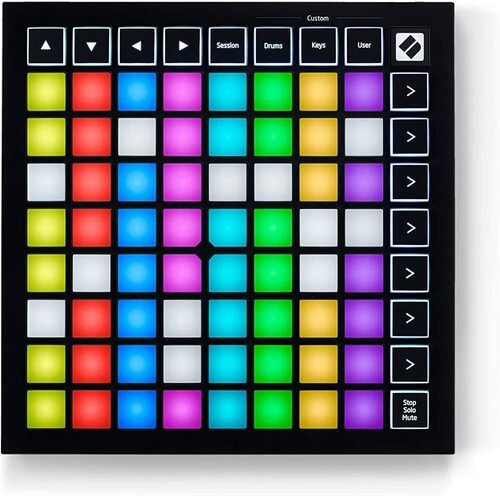
Tell us about your requirement

Price:
Quantity
Select Unit
- 50
- 100
- 200
- 250
- 500
- 1000+
Additional detail
Mobile number
Email

More Products in DJ Controller Category
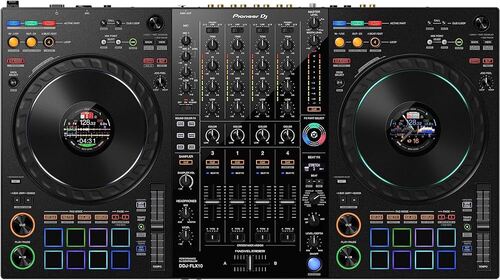
PIONEER DDJ-FLX10
Price 186390.0 INR / Piece
Minimum Order Quantity : 1 Piece
Channels : 4
Weight (kg) : 6.7 kg
Color : Black
Dimension (L*W*H) : 716 x 400 x 73.4 mm
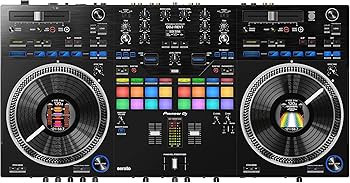
DDJ -REV7
Price 233290.0 INR / Piece
Minimum Order Quantity : 1 Piece
Channels : 2 Channels
Weight (kg) : 7.1 kg
Color : Black
Dimension (L*W*H) : 732 x 382.1 x 82.4 mm
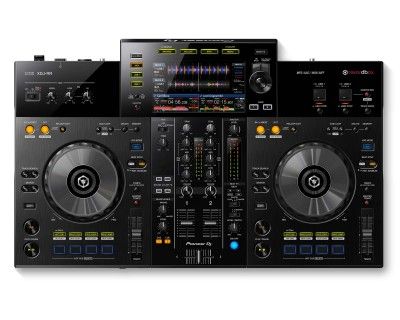
XDJ- RX3
Price 224590.0 INR / Piece
Minimum Order Quantity : 1 Piece
Channels : 2
Weight (kg) : 5.2 Kilograms (kg)
Color : Black
Dimension (L*W*H) : 24.6 x 15.3 x 2.9 Millimeter (mm)
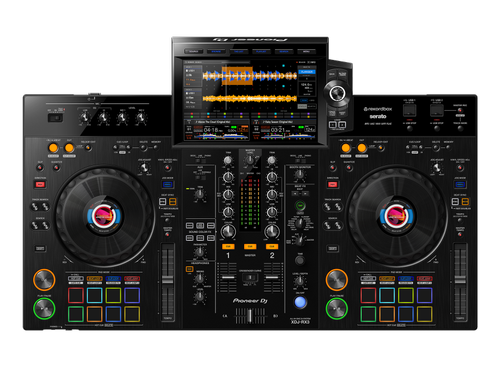
Pioneer XDJ-RX3 All in One DJ Controller
Price 244890.0 INR / Piece
Minimum Order Quantity : 1 Piece
Channels : 2
Weight (kg) : 9.3 Kilograms (kg)
Color : Black
Dimension (L*W*H) : 469.5 x 728.1 x 118.4 Millimeter (mm)


- B No. 67, Ganesh Chandra Avenue -Ground Floor, Near Hind Cinema,Kolkata - 700013, West Bengal, India
- Phone : 08071931135


- Mr Ashwin Jaiswal (Proprietor)
- Mobile : 08071931135
-
 Send Inquiry
 Send Inquiry
TECHNO VIBEZ
All Rights Reserved.(Terms of Use)
Developed and Managed by Infocom Network Private Limited.
Developed and Managed by Infocom Network Private Limited.

