


 Send Inquiry
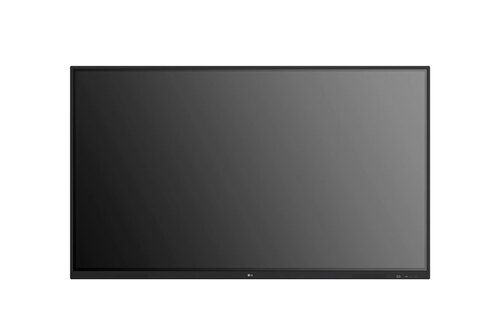
Viewsonic Interactive Flat Panel IN6503
Price 95000.0 INR/ Piece
MOQ : 1 Piece
Viewsonic Interactive Flat Panel IN6503 Specification
- Power Consumption
- 400W
- Voltage
- 100-240 V
- Usage
- Educational and Business Presentations
- Power Supply
- AC 100-240V, 50/60Hz
- Product Type
- Interactive Flat Panel
- Material
- Toughened Glass, Metal Frame
- Size
- 65 Inch
- Style
- Wall-mounted / Stand Supported
- Weight
- Approx. 47 kg
- Feature
- 4K UHD Touchscreen, Multi-touch Support, Wireless Connectivity, Eye-Care Technology
- Color
- Black
- Operating System
- Android 11 built-in, Windows compatible
- RAM / Storage
- 4GB RAM / 32GB Storage
- Built-in Speakers
- Yes, 2 x 15W
- Resolution
- 3840 x 2160 UHD (4K)
- Mounting Options
- VESA 600x400mm
- Contrast Ratio
- 1200:1
- Operating Temperature
- 0C - 40C
- Accessories
- Wall Mount Kit, Remote Control, Touch Pen, Power Cable
- Response Time
- 8ms
- Viewing Angle
- 178 / 178
- Touch Technology
- IR Recognition, up to 20 touch points
- Ports
- HDMI x3, VGA, USB 2.0/3.0, RS232, Audio in/out, LAN
- Brightness
- 350 nits
Viewsonic Interactive Flat Panel IN6503 About
Integrated access to the Google Play Store and Workspace suite simplifies collaboration. With the Android 14 launcher, you can put widgets, educational tools, and essential apps like Chrome, YouTube, and Google Search, within instant reach with a simple drag-and-drop onto your home screen.With the Google EDLA-certified IN03 series, educators and students can confidently use technology in a protected environment, thanks to automatic Android security and application updates. This also eases the workload of IT staff, who no longer need to worry about update maintenance.
Advanced Touch Technology for Seamless Collaboration
The IN6503 features infrared recognition supporting up to 20 touch points, allowing multiple users to interact simultaneously. This multi-touch capability enables smooth brainstorming sessions, collaborative lessons, and interactive presentations, fostering an engaging environment whether in a classroom or meeting space.
Stunning 4K UHD Display and Enhanced Audio
Experience breathtaking visuals on a 65-inch toughened glass screen delivering 3840 x 2160 UHD resolution, 350 nits of brightness, and a 1200:1 contrast ratio. The integrated 2 x 15W speakers fill the room with clear audio, ensuring every detail is seen and heard during presentations and group sessions.
Robust Connectivity and Versatile Compatibility
With HDMI, VGA, multiple USBs (2.0/3.0), RS232, LAN, and audio ports, the IN6503 fits effortlessly into various setups. It is compatible with both Android 11 and Windows, and wireless connectivity makes content sharing and device integration incredibly convenient for users in any educational or business environment.
FAQ's of Viewsonic Interactive Flat Panel IN6503:
Q: How does the IR recognition touch technology enhance interactive experiences on the IN6503 panel?
A: The IR recognition technology in the IN6503 supports up to 20 simultaneous touch points, facilitating collaborative work. Multiple users can draw, write, or manipulate content on the screen simultaneously, making it ideal for group activities and dynamic presentations.Q: What is the process for mounting the ViewSonic IN6503 Interactive Flat Panel?
A: The panel comes with a VESA 600x400mm mounting option, and a wall mount kit is included in the package. Simply follow the provided installation guide to securely attach the unit to the wall, ensuring proper alignment and stability.Q: Where can the IN6503 be effectively used, and what environments benefit the most?
A: The IN6503 is perfectly suited for educational institutions and corporate offices. Its interactive features and ultra-clear 4K display enhance learning in classrooms and facilitate engaging presentations in meeting rooms or conference halls.Q: What types of devices can be connected to the IN6503, and how does it support different operating systems?
A: The panel offers a variety of ports including HDMI, VGA, USB 2.0/3.0, RS232, and LAN, enabling connection to PCs, laptops, and other multimedia devices. It operates on built-in Android 11 and is compatible with Windows, so you can switch between systems seamlessly.Q: What built-in features support comfortable long-term use?
A: The IN6503 incorporates eye-care technology to reduce eye strain during lengthy sessions. Its toughened glass and metal frame design ensure durability, and the wide 178-degree viewing angle provides clear images from any position in the room.Q: How can the multi-touch support be beneficial for users during meetings or classes?
A: Multi-touch support allows several users to interact with the display concurrently. This is particularly beneficial during collaborative tasks, brainstorming sessions, or educational games, as it encourages team participation and keeps sessions highly interactive.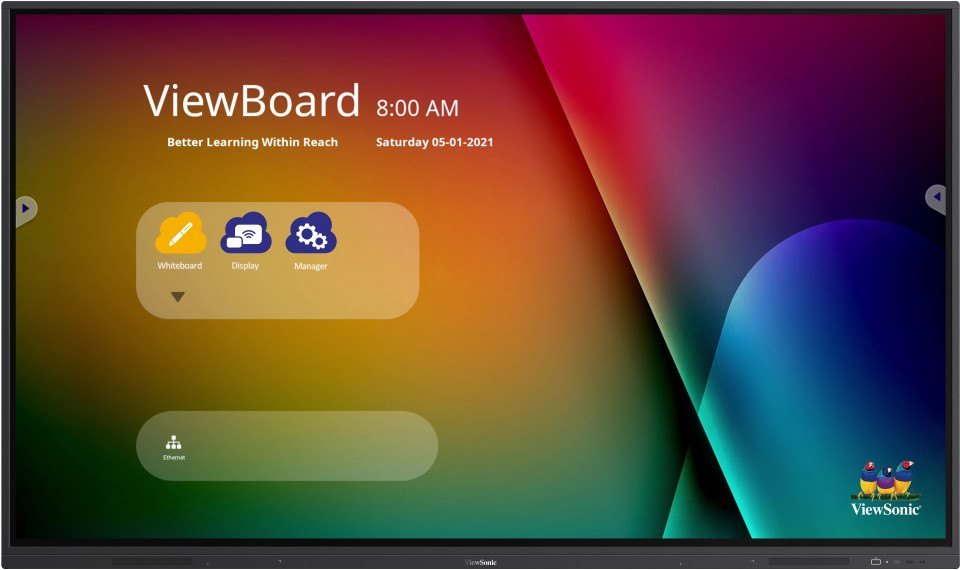
Tell us about your requirement

Price:
Quantity
Select Unit
- 50
- 100
- 200
- 250
- 500
- 1000+
Additional detail
Mobile number
Email

More Products in Interactive White Board Category
Samsung WA75C Interactive Flat Panel
Price 125000 INR / Piece
Minimum Order Quantity : 1 Piece
Color : Black
Product Type : Samsung WA75C Interactive Flat Panel
Usage : Industrial
Power Supply : Electric
75inch LG Interactive Flat Panel TR3ER
Price 105000.0 INR / Piece
Minimum Order Quantity : 1 Piece
Color : Black
Product Type : Interactive Flat Panel
Usage : Education, Conference Rooms, Corporate Collaboration, Interactive Presentations
Power Supply : AC 100240V, 50/60Hz
65inch LG Interactive Flat Panel TR3ER
Price 90000.0 INR / Piece
Minimum Order Quantity : 1 Piece
Color : Black
Product Type : Interactive Flat Panel
Usage : Education, Corporate, Conference Rooms, Collaboration
Power Supply : AC 100240V, 50/60Hz
Benq 65 Inch Interactive Flat Panel
Price 120000 INR / Piece
Minimum Order Quantity : 1 Piece
Color : Black
Product Type : Interactive Flat Panel
Usage : Educational, Office, Conference Room
Power Supply : AC 100240V, 50/60Hz


- B No. 67, Ganesh Chandra Avenue -Ground Floor, Near Hind Cinema,Kolkata - 700013, West Bengal, India
- Phone : 08071931135


- Mr Ashwin Jaiswal (Proprietor)
- Mobile : 08071931135
-
 Send Inquiry
 Send Inquiry
TECHNO VIBEZ
All Rights Reserved.(Terms of Use)
Developed and Managed by Infocom Network Private Limited.
Developed and Managed by Infocom Network Private Limited.

